
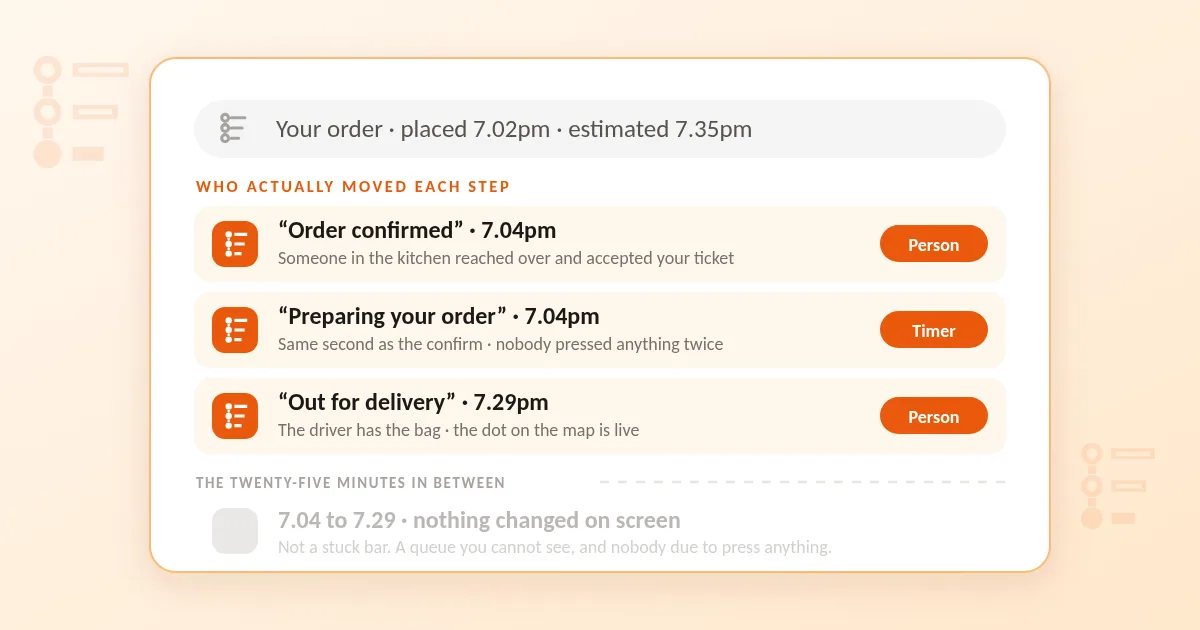
You order at seven. The delivery tracker fills in three steps almost at once, landss on Preparing your order, and then stops. Twenty minutes later it is still there, and you are refreshing a page that has nothing new to say.
Most of us are asking it the wrong question. Not how long now, but: did that step move because somebody pressed a button, or because a clock reached a number?
Every progress bar is a mix of the two. The steps a person pressed are news. The steps a timer moved are decoration. They look identical on your phone and they are worth completely different amounts.
Here is the bar, step by step.
"Order placed"
This one is yours. You pressed it.
It confirms your basket left your phone and nothing else — not that the restaurant has seen it, not that anyone is standing near a printer. On a quiet Tuesday that distinction is academic. At half past seven on a Friday it is the whole thing.
"Order confirmed" — the only step that is always a person
Somewhere in the kitchen your ticket printed and somebody reached over and accepted it. There is no faking this one: a human had to touch a screen.
Which makes the gap between placed and confirmed the most informative number of your evening, and almost nobody looks at it. A minute or two means the person on the counter is on top of the queue. Eight or ten on a busy night means tickets are arriving faster than anyone can look at them, and yours has been sitting in a pile.
It is also the only step whose absence means anything. If nothing has been confirmed after about ten minutes, ring them — not to chase the food, but to find out whether the order exists. Printers run out of paper, and a tablet at the back of a kitchen can sit face down under a menu all evening. Do not re-order first; you will very often end up with two.
"Preparing your order"
This is the most misread line on the screen, because it sounds like a description of what is happening to your food. Usually it isn't.
On most systems it appears automatically the instant the order is accepted — same second, no second button. It does not mean your chicken is on the grill. It means your ticket has joined the queue with everyone else's, and on a Friday that queue is long.
So a bar that sits on Preparing for twenty-five minutes is not stuck and not a lost order. It is a screen with nothing new to report, which is exactly what you would expect between the two moments a human is asked to press something.
The estimate above it may move, and that is worth a glance. A time that stretches from 30 minutes to 55 is not a glitch — it is the kitchen being honest about the queue. (Owners: the quoted time is a setting, and it should not be one number.)
"Out for delivery" — and the dot
Two different things sharing a step.
The label itself may be a press or a timer, depending on the restaurant. The dot on the map is neither: it is live, and it is the only part of this screen that is genuinely watching something happen.
It is also the part people most often misread. A driver moving away from you is not lost and not an error — they are very likely dropping something else first, and your bag is already in the car. One who has not moved in six minutes is probably waiting at a kitchen that is not yours.
"Delivered"
Pressed by the driver, sometimes on the doorstep before you have opened it, occasionally a few seconds before they have reached it. Treat it as the end of the tracking, not the end of the delivery: if the screen says delivered and nobody is there, give it ninety seconds.
So what is the delivery tracker good for?
Not for deciding when to put the plates out. Between the confirm and the driver appearing it is a picture of a queue you cannot see, and refreshing adds nothing to it. Three things are worth your attention:
The gap between placed and confirmed. Keep a rough sense of it for the places you order from often. Somewhere that always confirms in a minute is running a tidy counter.
Whether the estimate ever moves. A restaurant that lets the number climb on a Friday is telling you the truth. One that shows 30 minutes every night of the week is showing you a default setting.
The last few minutes on the map. That part is real, and it is the only part worth actually watching — being at the door rather than behind it is worth more than everything else on this list.
The honest limit
A delivery tracker can only report what the restaurant's till tells it. Some kitchens run a system that flips every step at the end, so you get four green ticks in the last minute and learn nothing all evening. That is not anyone being shifty — it is a till that does not report in stages.
It works the other way too. A bar that animates smoothly from step to step, hitting each one on schedule, may simply be a timer running from the moment you paid. A screen that only speaks when something real happens is worth more than a well-behaved animation.
Where FoodCiti fits
You get real-time tracking on every order, and because you are ordering from the restaurant's own page rather than through a middleman, the confirm you are waiting on is a person in that kitchen rather than a dispatch queue somewhere else.
Mostly local independents, which means short routes and a dot that does not wander across town before it finds you. Collection on the same menu as delivery, for the nights you would rather walk round. Free delivery over £15.
Order, check the confirm, then put the phone down. The middle of the bar has nothing for you.